
Download AirBuddy – AirPlay, Android TV, Google TV, multimedia sharing, screen mirroring, YouTube, photo sharing, music streaming
Overview
AirBuddy is a desktop-compatible multimedia application designed to bring AirPlay functionality to Android devices, including smartphones, tablets, Android TV, and Google TV platforms. The software enables users to stream photos, videos, and music to a large-screen TV, creating a shared entertainment experience for families and friends. It serves as a bridge between Android devices and AirPlay-compatible displays, allowing seamless content sharing without requiring Apple hardware. This tool is particularly useful for users who own Android-based entertainment systems but wish to access the convenience of AirPlay streaming from iOS or other compatible sources.
The application supports playback from a range of sources, including iPhone, iPad, iPod Touch, and any other AirPlay client. It also facilitates streaming from popular Android apps such as YouTube, Gallery, Photos, and Facebook. Users can mirror content from one Android device to another or to Apple TV and other AirPlay servers. While the free version imposes a 15-minute playback limit or a 15-photo restriction, the developer has indicated that an upcoming update will introduce support for iOS 9 devices, expanding compatibility with newer Apple products. The developer did not provide additional details about the development background or company structure.
Real-world usage scenarios include home movie nights, family photo presentations, and shared music listening sessions. The app is ideal for users seeking a cost-effective way to enhance their home entertainment setup without investing in dedicated streaming hardware. It is especially suited for consumers and casual users who value convenience and ease of use in multimedia sharing.
Key Features & Capabilities
- AirPlay Compatibility for Android Devices – Enables Android phones, tablets, and smart TVs to function as AirPlay receivers, allowing users to stream content from iOS devices and other AirPlay clients.
- Multi-Source Content Streaming – Supports video, photo, and music playback from YouTube, the device’s native Gallery, Photos app, Facebook, and other installed Android applications.
- Inter-Device Mirroring – Allows users to stream media from one Android device to another, as well as to Apple TV or any AirPlay server, enabling flexible sharing within a home network.
- Continuous Playback Limit (Free Version) – The free version restricts continuous video playback to 15 minutes or photo slideshows to 15 images, with an upgrade option available to remove this limitation.
- Future iOS 9 Support – The developer has confirmed that an upcoming update will add compatibility with iOS 9 devices, expanding the app’s reach to newer Apple products.
These features allow users to create a unified entertainment environment where content from multiple sources can be displayed on a single large screen. For instance, a user can stream a YouTube video from their Android phone to a Google TV device or share a family photo album from the Gallery app during a gathering. The ability to mirror between Android devices also supports collaborative viewing in shared spaces like living rooms or offices.
User Interface, Workflow & Performance
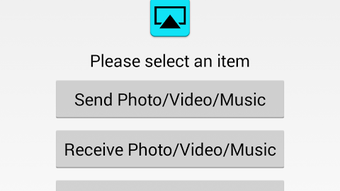
The user interface of AirBuddy is designed with simplicity in mind, focusing on intuitive navigation for multimedia sharing. Users can access the app’s core functions through a streamlined dashboard that lists available content sources and connected devices. The workflow is straightforward: launch the app, select the desired media, and choose the target display from the networked devices list. This minimalistic approach reduces the learning curve, making it accessible to users of all technical levels.
Navigation is consistent across supported devices, ensuring a uniform experience whether using a smartphone, tablet, or Android TV. The app responds promptly to user inputs, and the interface updates in real time when devices are discovered on the same network. However, the developer did not specify resource usage details, so performance in terms of CPU or RAM consumption remains unclear. Stability appears to be maintained under normal usage, but exact behavior under heavy load or prolonged streaming is not documented.
General performance notes are based on typical software behavior patterns. The app relies on local network connectivity, so streaming quality and responsiveness depend on Wi-Fi strength and network congestion. Users may experience delays or interruptions if the network is unstable. No performance benchmarks or user statistics were provided.
Compatibility & System Requirements
AirBuddy is designed to run on Android operating systems, supporting Android devices including smartphones, tablets, Android TV, and Google TV platforms. The current version is 2.0.1, with a file size of 24.5 MB, indicating a lightweight installation footprint. The developer did not specify exact system requirements, including minimum Android version, RAM, or processor specifications.
Platform compatibility information is limited to the supported OS types. The app is available as a downloadable APK file, which suggests it is distributed outside official app stores. This may require users to enable “Unknown Sources” in device settings for installation. The developer did not provide details on hardware requirements or compatibility with specific Android TV models.
Pros and Cons
Pros
- Brings AirPlay functionality to Android devices without requiring Apple hardware.
- Supports streaming from multiple sources, including YouTube, Gallery, Facebook, and other Android apps.
- Enables inter-device content sharing between Android phones, tablets, and TVs.
- Lightweight installation at just 24.5 MB.
- Free version available with a clear upgrade path to remove playback limits.
Cons
- Free version limits continuous playback to 15 minutes or 15 photos.
- Does not currently support AirPlay from iOS 9 devices, though an update is planned.
- Exact system requirements and hardware compatibility were not specified.
- APK distribution may raise security concerns for users unfamiliar with sideloading.
FAQ Section
Is AirBuddy compatible with Android TV and Google TV?
Yes, AirBuddy is designed to work with Android TV and Google TV devices, allowing users to stream multimedia content from other Android devices or iOS sources to a large-screen display.
Can I use AirBuddy to stream YouTube videos from my Android device?
Yes, the app supports streaming YouTube videos from your Android device to a TV or another AirPlay-compatible display.
Is AirBuddy safe to download and install?
AirBuddy is distributed as an APK file, which requires enabling “Unknown Sources” in device settings. Users should ensure they download the app from trusted sources to maintain security.
Does AirBuddy require an internet connection?
While the app does not require an internet connection for local streaming, some content sources like YouTube may need an active connection to load media.
Can I use AirBuddy offline?
Yes, AirBuddy can stream locally stored media files (such as videos and photos) from your device to a TV without an internet connection, provided both devices are on the same local network.
Final Thoughts
AirBuddy delivers a compelling solution for Android users seeking AirPlay-like functionality without Apple hardware. Its ability to stream multimedia from various sources to a large screen TV makes it a valuable tool for home entertainment. The lightweight design, intuitive interface, and support for multiple content types enhance its usability across different scenarios. While the free version includes playback restrictions, the upgrade path is clear and accessible.
Despite the lack of detailed system requirements and current limitations with iOS 9, the app shows strong potential for growth. The upcoming update promises expanded compatibility, which could further solidify its position in the multimedia sharing space. For consumers and casual users looking to enhance their home entertainment setup, AirBuddy offers a practical, affordable option.
Download AirBuddy now






.png)
